Can water-stained photos be saved?
How to fix water damage and ring stains on photos
A glass set down on a print, a damp box in the garage, one leak in a cupboard: water writes rings and tide marks across photographs. Most of them can go.


 Before
 After
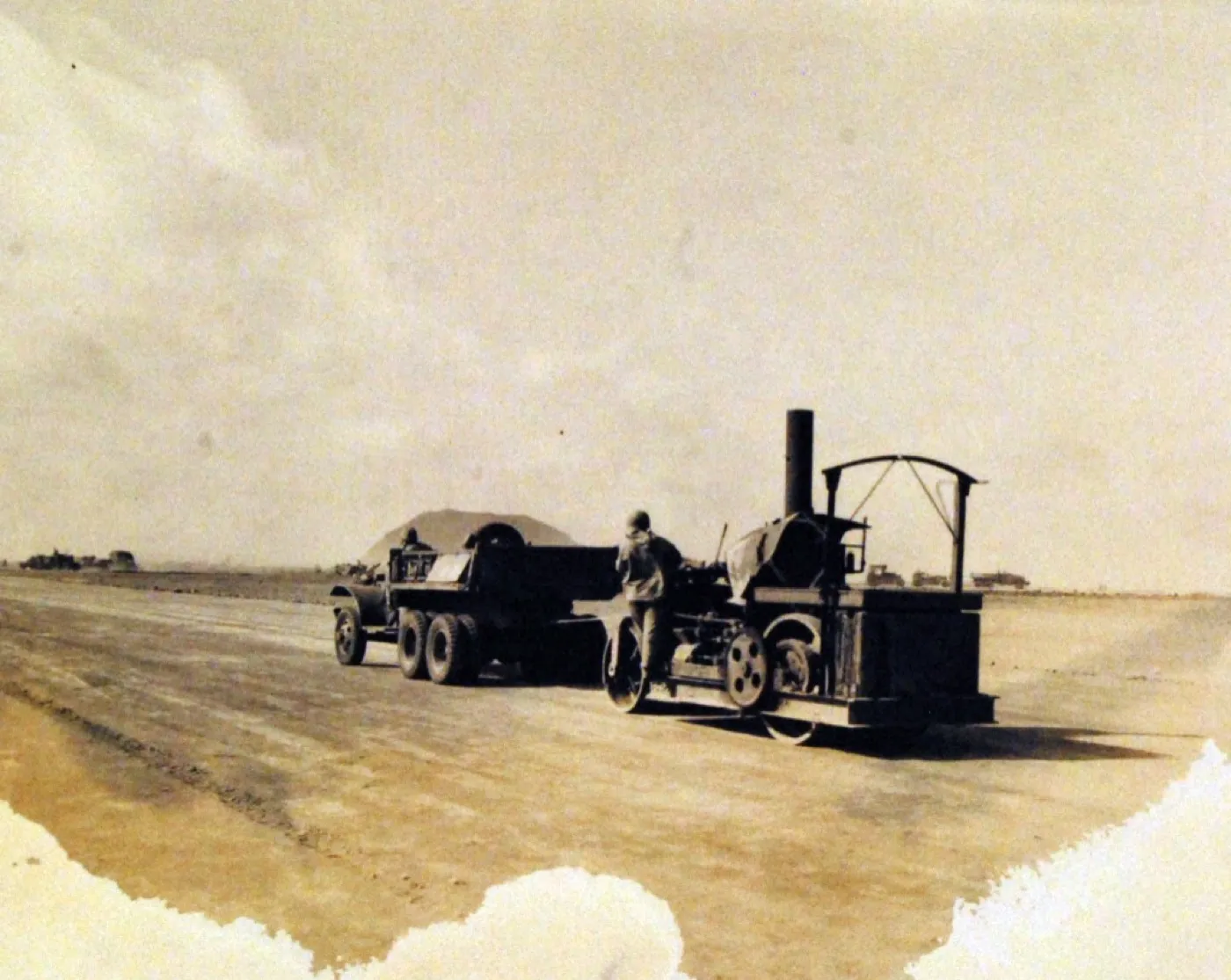
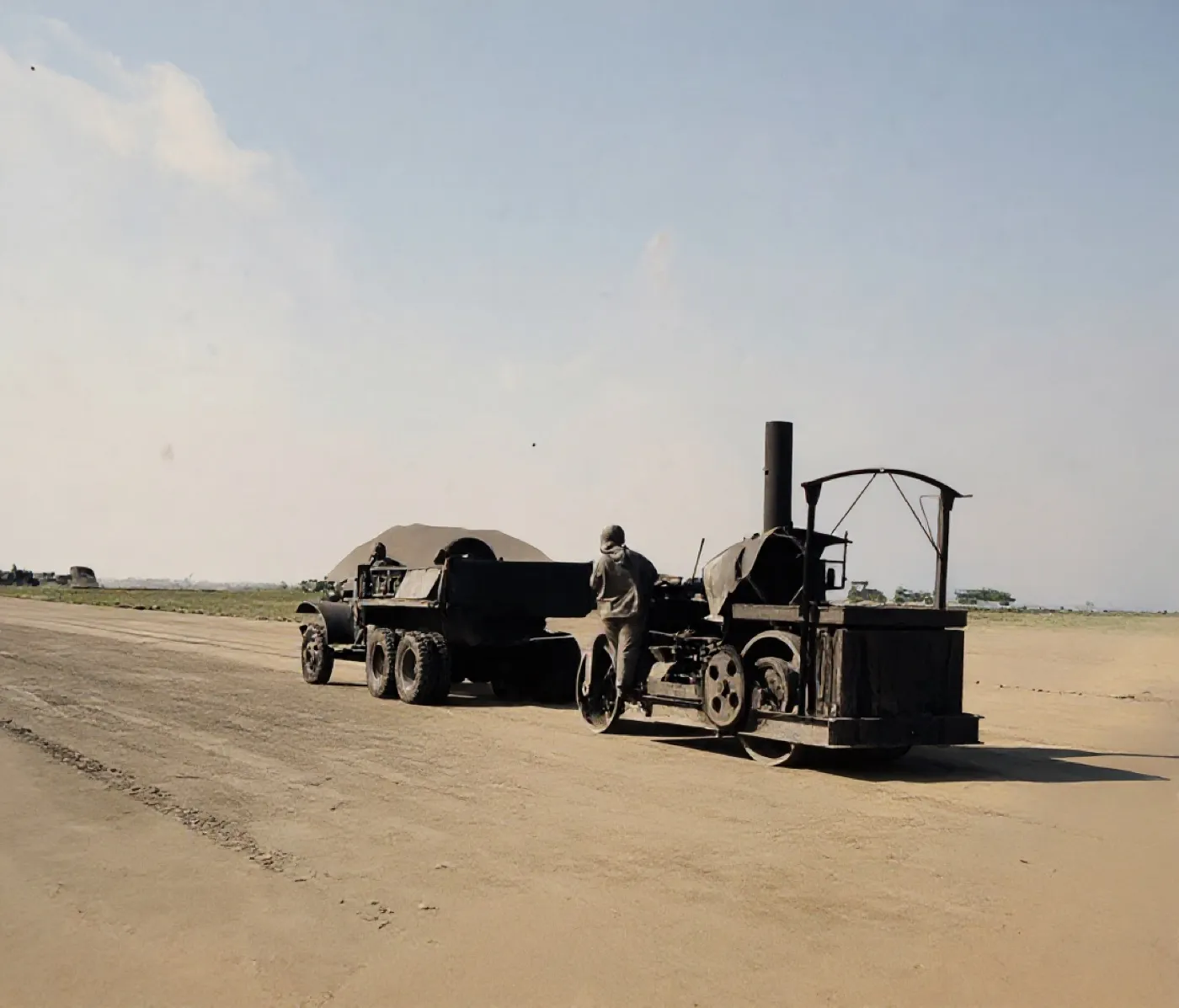
AfterA tide line burned across the foot of a 1940s record photograph
A textbook tide mark: darkest at its own drying edge, with the picture intact underneath. The frame should show the stain lifting and the detail beneath it surviving.
The tide line lifted and the detail underneath it survived, which is exactly what this page predicted would happen: a stain sits over the picture rather than destroying it. The road, the tractor, the trailer and the standing figure all hold their shape. The control also colourised the photograph without being asked. That is not a setting we chose, it is what Restore does to every black and white photograph it is given.
- Source
- US Marine Corps record photograph 127-GW-304-110873
- Holder and licence
- US National Archives, public domain, United States government record
- Control used
- Restore
- Model it called
- flux-kontext-apps/restore-image on Replicate
- Elapsed
- 5.0 seconds
- Output size
- 1104 x 944 px
- Captured
- 17 Sep 2026

What this damage is
Water damage shows up as rings, tide lines and blotches because the liquid moves through the image layer unevenly and drags dissolved material to its drying edge. That is why the mark is darkest at its outline, the shape of the spill drawn around its own border.
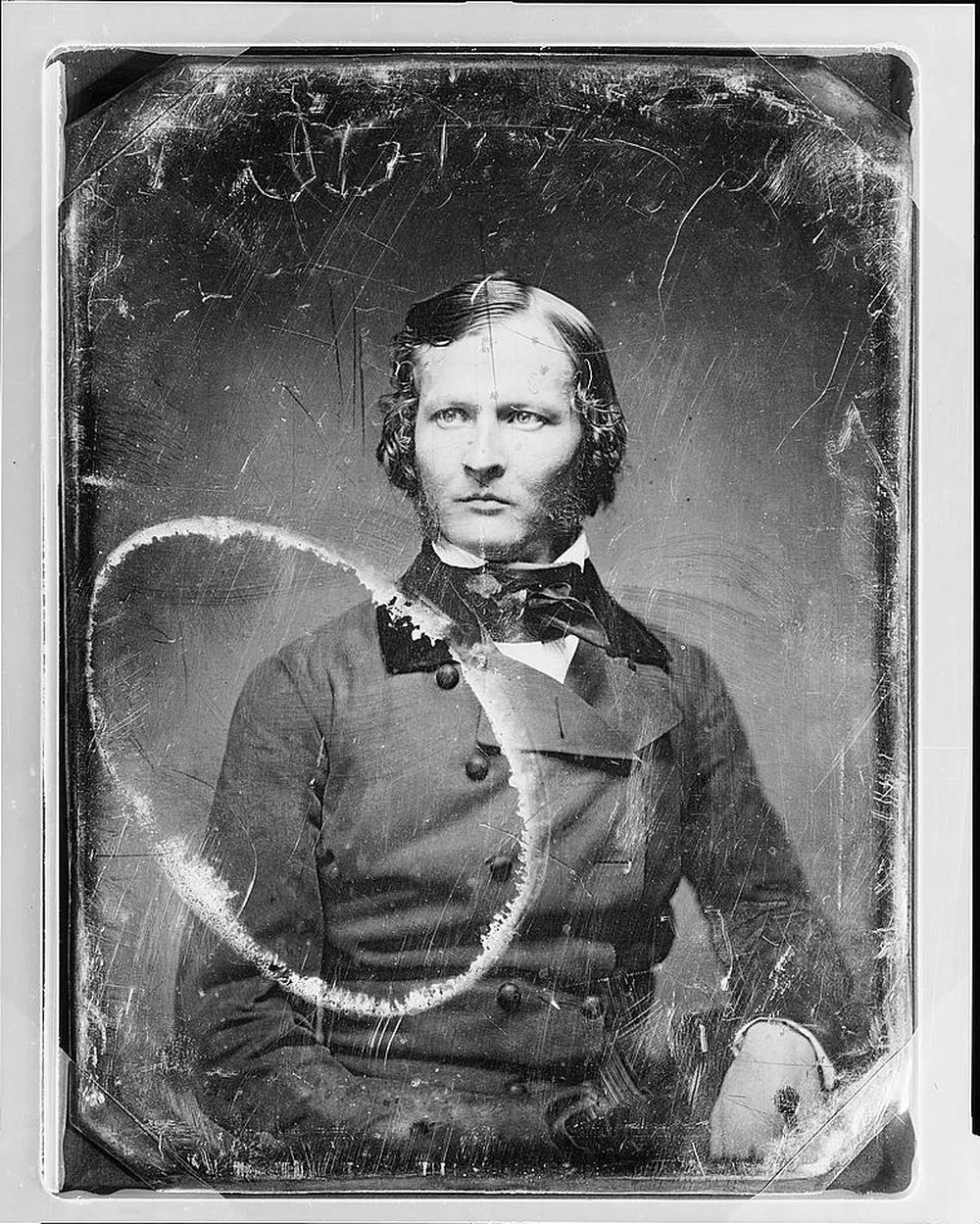
The photograph below carries a near perfect ring, most likely from liquid or adhesive trapped under its cover glass for a century. The same shape appears on prints under a glass or a vase.
Can it be fixed?
Because a stain changes the tone of the picture rather than destroying it, AI restoration does very well here: it separates the stain pattern from the image beneath and rebuilds even tone. The face inside the ring below survived untouched, which is typical, and the repair is close to invisible. Photos that were soaked and then stuck to glass or to each other are a different, harder problem: scan them exactly as they are and do not peel them apart.
If the photographs are wet right now, stop the clock first
Water is not the thing that destroys photographs. Time is. A print that is soaked but handled correctly within a day usually survives. The same print left in a warm pile for a week is often gone for good, because mould has eaten the image layer. Mould can start within roughly 24 to 48 hours on a damp surface, faster in warm conditions.
Do not try to dry everything at once. That is the mistake that loses collections: hundreds of wet prints spread across a floor, daylight and space run out, and what comes back is a fused, mouldy block.
- Get them out of the water and into a cool, dry place with moving air. Warmth accelerates mould, so no heaters and no direct sun.
- Separate anything stuck together gently, while it is still wet. It is far easier now than it will ever be again. If two prints will not part without force, leave them and deal with them last.
- Rinse off mud and debris with clean or distilled cold water. Silt left on the surface dries into the emulsion.
- Triage. Decide what matters most, because you will not save everything at once.
The freezer buys the time you do not have
This comes straight from conservation practice: if you cannot dry the photographs properly right now, freeze them. Freezing stabilises wet material and halts mould growth. It does not reverse damage, it stops the deterioration clock while you work through the collection at a sane pace. A domestic freezer is fine.
- Take the photographs out of any sleeves, albums or enclosures first.
- Separate individual prints where you can.
- Interleave with wax paper so they cannot fuse to each other.
- Bag the bundles in ziplock or bin bags.
- Freeze, and work through them in batches when you have time.
The four you must never freeze
Some photographic processes are destroyed by water and by freezing both. Cased images, daguerreotypes, ambrotypes and tintypes are extremely water sensitive, must not be frozen, and may not be recoverable.
How to recognise them: they are usually nineteenth century, the image sits on metal or glass rather than paper, and they often live in a small hinged case with a velvet lining. If that describes what you are holding, air dry it flat, do not touch the image surface, and contact a conservator quickly. These are the photographs where professional help genuinely changes the outcome.
Drying, properly
- Lay prints image side up on absorbent material. Plain paper towel, blotting paper and unprinted newsprint all work.
- Change the absorbent layer as it becomes damp, several times if needed.
- Keep air moving. A fan in the room helps, but do not aim it directly at the prints.
- Expect curling. Flatten afterwards under light, even weight between clean sheets of paper for a few days.
- Never press anything onto a wet emulsion. While wet the image layer is soft and will lift away with whatever touches it. If a surface has gone milky, sticky or tacky, stop handling it and let it air dry untouched.
Where the repair stops
A stain sits over the picture, so most of this damage is tonal and comes off cleanly. Where water actually dissolved the image layer, or lifted it onto glass, there is nothing underneath to recover and the flat patch that remains is the honest result.
Before any repair, get a proper scan: the DPI advisor gives the right setting in two questions, and the scanning guide covers the craft.
This page absorbed the water damaged photographs guide, merged here on 16 Sep 2026. Nothing was deleted: the old address now leads here.
One water-stained print with a hard tide line along its foot, run through three tools on the same day.
Photo Restore
Our own app, the Restore control
- Elapsed
- Awaiting the run
- Verdict
- Not written yet
Pending a run: every restoration is billed to a hosted model, so it needs sign-off.
MyHeritage Photo Enhancer
Free tier, with In Color
- Elapsed
- Awaiting the run
- Verdict
- Not written yet
Pending the chairman: the free tier will not release a result without an account.
Remini
Free tier, the enhance preset
- Elapsed
- Awaiting the run
- Verdict
- Not written yet
Pending the chairman: the free tier is an app install behind a sign-in.
When these three frames exist, this bench will say plainly what each tool beats us at. A comparison that only ever finds us in front is an advert, and we have said so on the about page since July.
Five things to do to the original, in this order
- If it is still wet, stop reading and go to the drying steps above.
- Never peel apart prints that have dried together.
- Let it dry completely before it goes anywhere near a scanner.
- Scan at 600 DPI in colour, so the tide line and the paper tone are both recorded.
- Keep the original flat and dry. The stain stays on the paper; the scan is the working copy.
Common questions
- Can water-damaged photos be restored?
- Stains, rings and tide marks restore very well because the image is discoloured, not missing. Photos that were soaked until the surface dissolved or stuck to glass are harder; scan them as they are, never peel them.
- My photos are stuck together after a flood. What should I do?
- Do not pull them apart dry; the surface will tear away. Photo conservators soak stuck prints apart in cool water. If the photos matter, scan the block as it is first so something is preserved, then decide about professional help.
- Do ring stains come back after restoration?
- The digital copy is permanent. The original print will keep its stain, so store it flat, dry and out of sunlight, and treat the restored scan as the working copy.
- Can you freeze wet photographs?
- Yes, and for most prints it is the single most useful thing you can do if you cannot dry them immediately. Freezing halts mould, which can start within 24 to 48 hours on a damp surface. Separate the photographs first, interleave them with wax paper, bag them, and freeze. It pauses the damage rather than reversing it, which is exactly what you need when there are more photographs than hours.
- Which photographs should never be frozen?
- Cased images, daguerreotypes, ambrotypes and tintypes. These are very sensitive to water, must not be frozen, and may not be recoverable at all. Air dry them and contact a conservator as soon as you can. If a photograph is on metal or glass, or sits in a small hinged case, treat it as one of these.
- How long do I have before mould starts?
- Roughly 24 to 48 hours on a damp surface, faster in warm conditions. That window is why freezing matters. Mould is far more destructive than water itself because it eats the image layer, and once it has taken hold the damage is permanent.
- Should photographs be dried face up or face down?
- Face up, on absorbent material such as plain paper towel or blotting paper, and change the material as it takes on water. Never press anything against the image surface while it is wet, because the emulsion is soft and will lift.
The damage is the before. You hold the after.
Real repairs on real photographs. Your family's copies deserve the same rescue.