Can grimy old photos be cleaned digitally?
How to clean dirt and grime off old photos
A century of hands, drawers and dust settles into the surface of a photograph. The safe cleaning happens after scanning, not before.




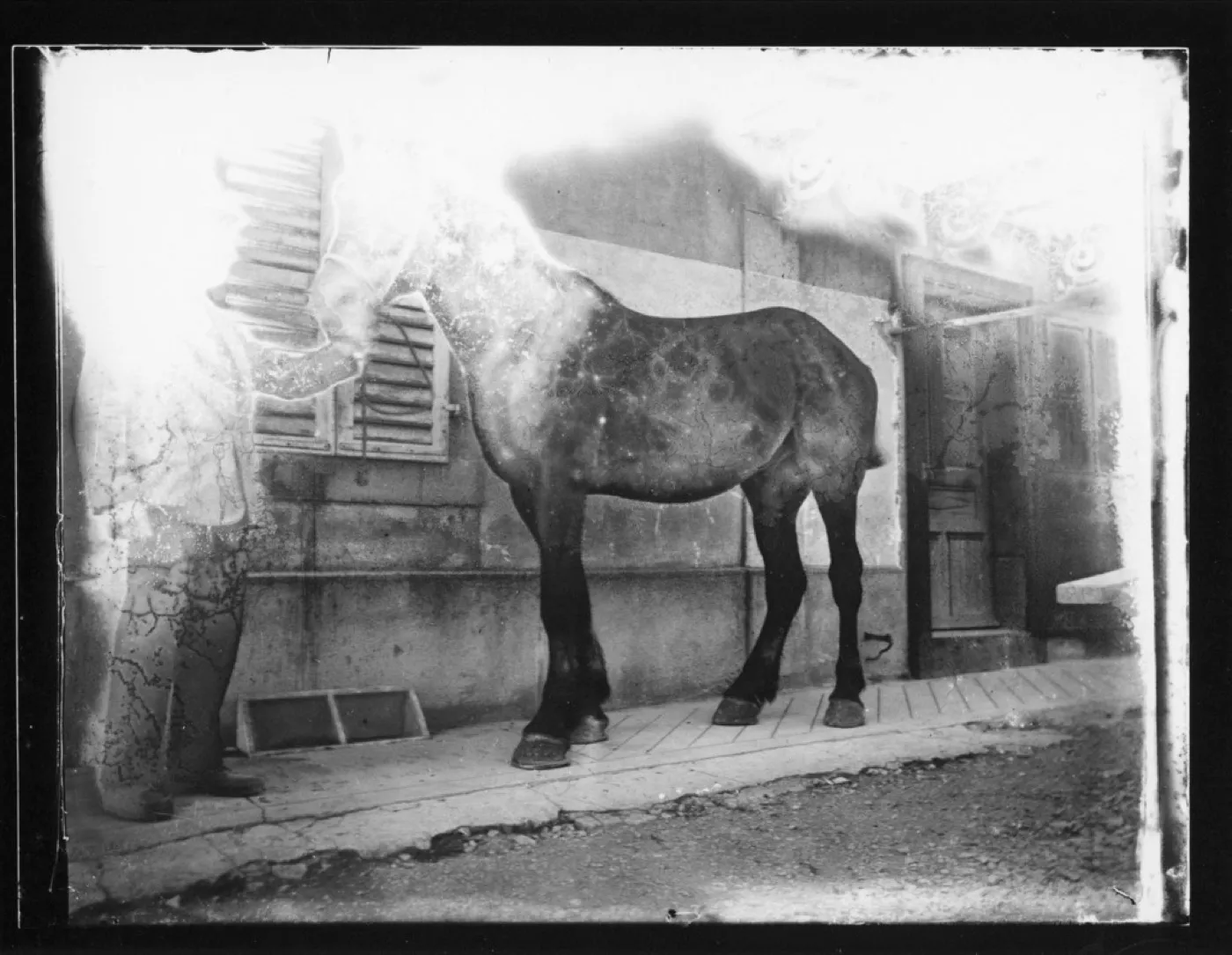 Before
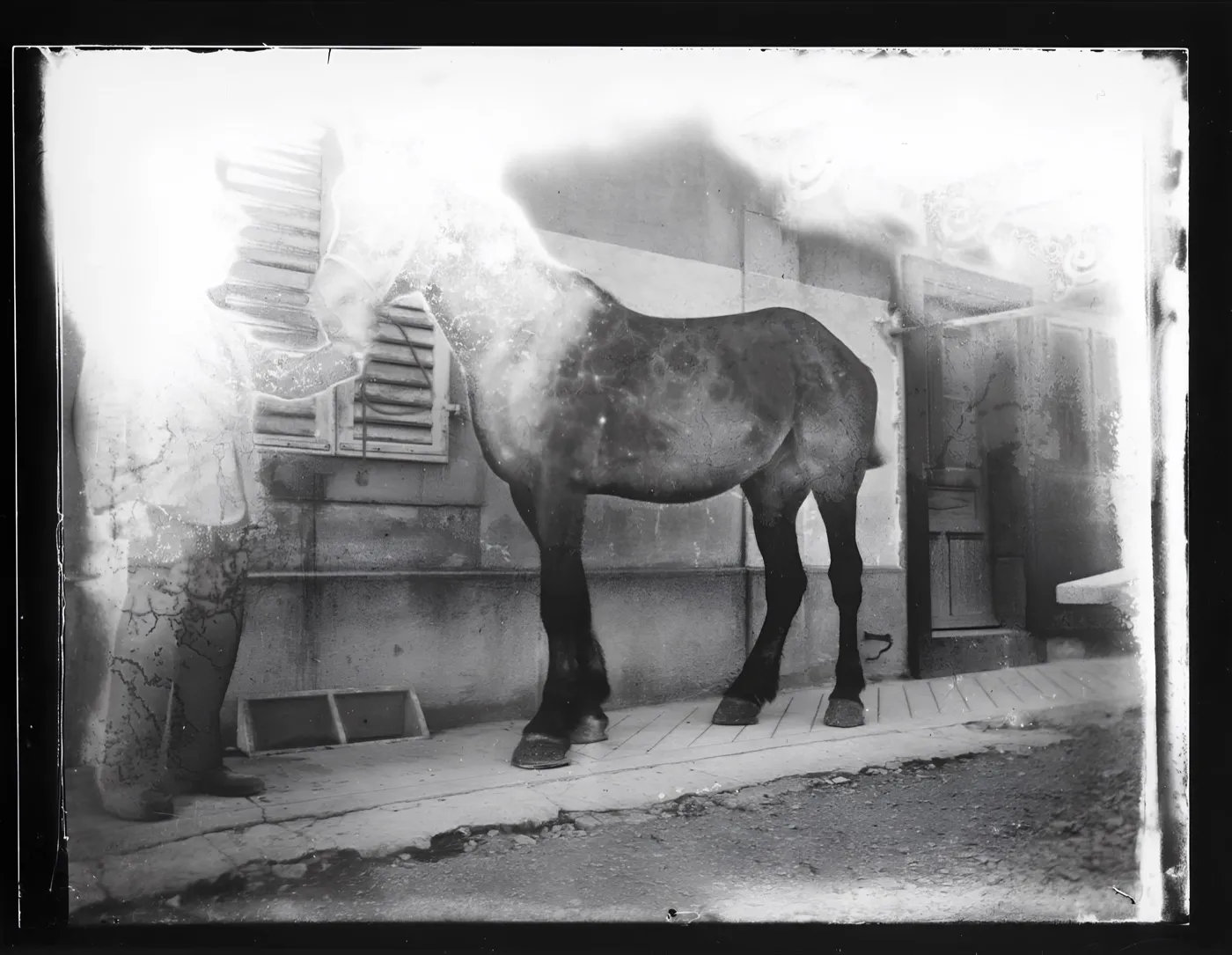 After
AfterA glass plate with heavy surface haze and streaking
Haze on a glass plate is the friendliest case there is: nothing is missing, it is only obscured. If a tool cannot do this one well it cannot do any of them.
The friendliest case on the site and the control handled it. Grain is gone, the ironwork on the stable door and the joints between the cobbles are sharp, and the horse keeps its markings rather than being smoothed into a shape. The haze itself is still sitting on the plate. Enhance resolves what is underneath the haze better, it does not lift the haze off.
- Source
- Archives cantonales jurassiennes, 137 J 1130
- Holder and licence
- Wikimedia Commons, public domain
- Control used
- Enhance
- Model it called
- jingyunliang/swinir on Replicate
- Elapsed
- 10.6 seconds
- Output size
- 4096 x 3176 px
- Captured
- 17 Sep 2026
What this damage is
Grime on photos is cumulative and gentle: skin oils from every hand that held it, airborne dust that settled and stuck, soot if a house had fires, all bedding into the surface with fine abrasion from every drawer it slid around in.
The result is a grey veil with speckling, like both portraits below. Nothing is missing; the picture is just buried.
Can it be fixed?
Physical cleaning should stop at a soft dry brush for loose dust. Anything wet, and anything that rubs, trades surface dirt for permanent abrasion. Scan the photo as it is; grime scans fine. Digital restoration then removes the veil, the speckling and the fine scratch haze in one pass, as both examples show. The originals stayed exactly as they were, which is the point.
Where the repair stops
Grime sitting on top of the picture lifts easily. Abrasion that has worn the picture away is a different thing wearing the same face, and no amount of cleaning brings it back. If a worn area comes back sharper than the rest of the print, treat the sharpness as composed.
Before any repair, get a proper scan: the DPI advisor gives the right setting in two questions, and the scanning guide covers the craft.
One grimy glass plate negative with heavy surface haze, run through three tools on the same day.
Photo Restore
Our own app, the Restore control
- Elapsed
- Awaiting the run
- Verdict
- Not written yet
Pending a run: every restoration is billed to a hosted model, so it needs sign-off.
MyHeritage Photo Enhancer
Free tier, with In Color
- Elapsed
- Awaiting the run
- Verdict
- Not written yet
Pending the chairman: the free tier will not release a result without an account.
Remini
Free tier, the enhance preset
- Elapsed
- Awaiting the run
- Verdict
- Not written yet
Pending the chairman: the free tier is an app install behind a sign-in.
When these three frames exist, this bench will say plainly what each tool beats us at. A comparison that only ever finds us in front is an advert, and we have said so on the about page since July.
Five things to do to the original, in this order
- Brush loose dust off with a soft dry brush. That is the whole permitted intervention.
- Never use a damp cloth. Water swells the image layer and rubbing marks it permanently.
- Scan at 600 DPI in colour: the scanner sees the grime clearly, and that is useful.
- Keep the scan before any cleaning as the master.
- Store the print somewhere the dust is not coming from.
Common questions
- Is it safe to clean an old photo with a damp cloth?
- No. Water swells the image layer, and rubbing while it is soft leaves permanent marks. A soft dry brush for loose dust is the sensible limit before scanning.
- Should I clean a photo before or after scanning?
- Brush off loose dust, then scan. Everything else is safer to remove digitally, where a mistake costs an undo instead of the photograph.
- Why do my scans look dirtier than the photo?
- Scanners see evenly and mercilessly; the eye forgives grime that a 600 DPI scan records in full. That detail is useful: the restoration model uses it to separate dirt from picture.
The damage is the before. You hold the after.
Real repairs on real photographs. Your family's copies deserve the same rescue.