Can a blurry old photo be fixed?
How to fix a blurry old photo, and when you cannot
Two of the three things that look like blur cannot be fixed by anything, however good. It is worth forty seconds working out which one you are holding before you reach for a sharpening tool.
 Before
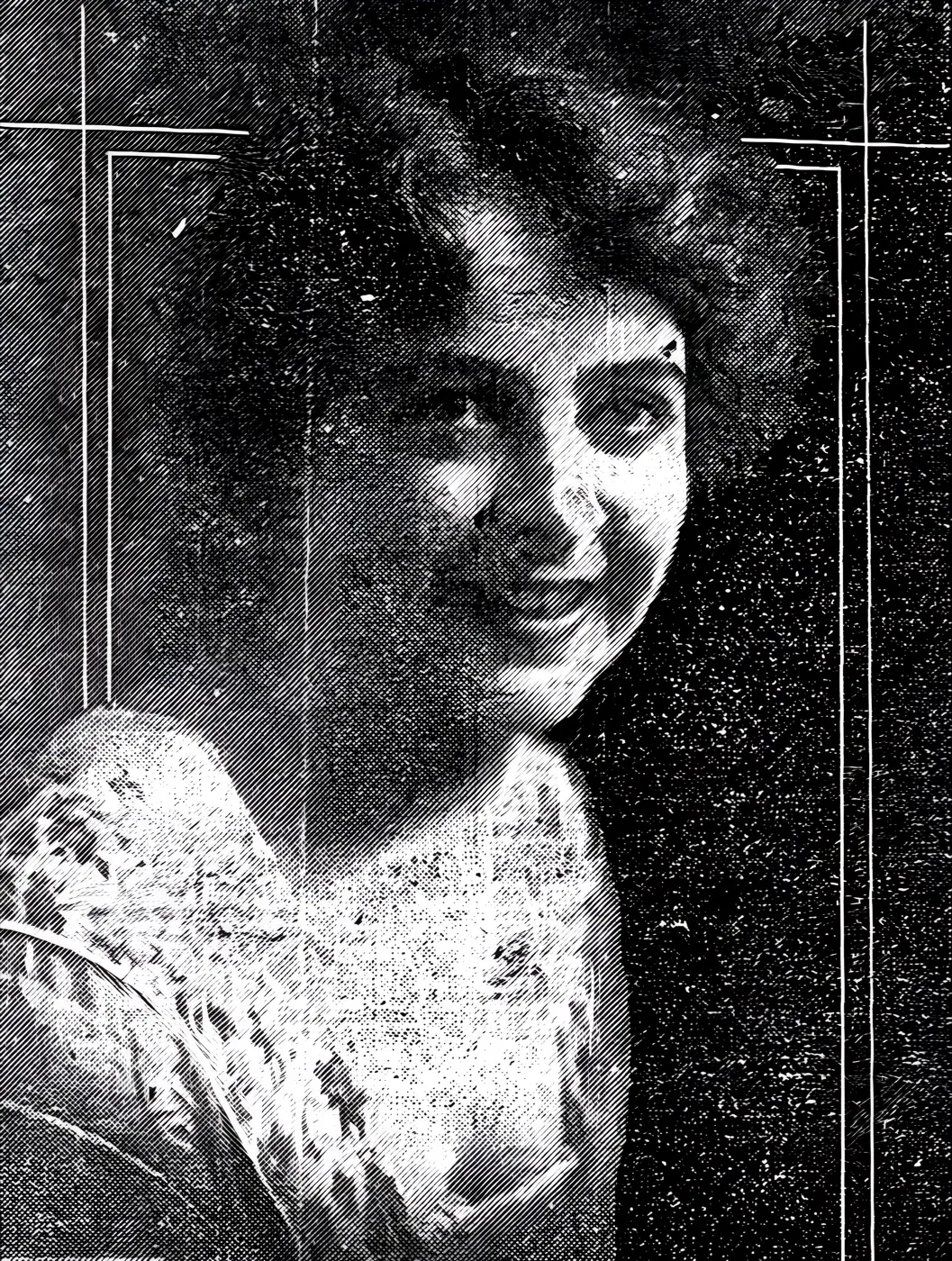 What came back
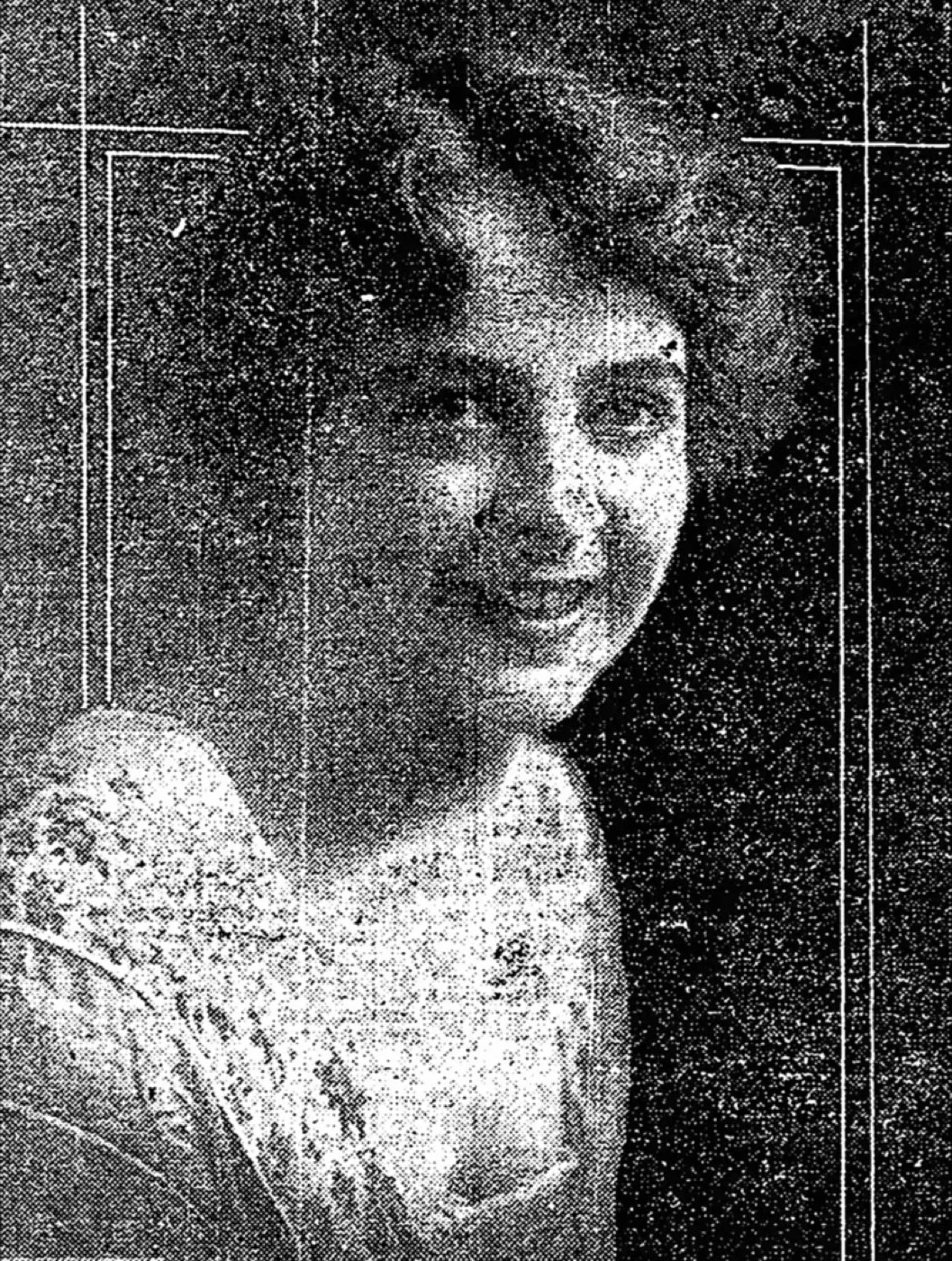
A soft 1919 newspaper portrait, screened and grainy
A print that is soft for two reasons at once, the halftone screen and the copy. The frame is here to separate a real resolution gain from invented crispness.
Enhance made this one worse, and the reason is worth knowing. The print is a newspaper halftone, so the thing the control found to sharpen was the dot screen, not the face. At full size the second frame is a field of hard diagonal lines with a woman somewhere behind it, and she is less readable than she was in the original. A screened or printed-from-newsprint photograph is the case to run through nothing at all. Rescan the original print if one exists.
- Source
- Betty Stoddard, 1919
- Holder and licence
- Wikimedia Commons, public domain, copyright expired
- Control used
- Enhance
- Model it called
- jingyunliang/swinir on Replicate
- Elapsed
- 11.4 seconds
- Output size
- 3092 x 4096 px
- Captured
- 17 Sep 2026

What this damage is
Camera shake moved the camera while the shutter was open. It shows as a directional smear, everything dragged slightly one way, most visible on a hard edge like a collar or a window frame. It happens in low light at a slow shutter speed, which describes most indoor photography before flash became reliable and cheap.
Missed focus put the sharp plane somewhere other than the person, often a step behind them. That blur is even across the frame and has no direction to it. A soft print from a sharp negative is the third case, and it is not blur at all, it is a bad copy of a fine original. Only that third case has a real fix, because the detail still exists somewhere.
Can it be fixed?
Look at the actual print, not the scan, under good light and ideally with a loupe. A print that reads sharp to the eye but scans soft tells you the scan is the problem, and a rescan fixes it properly. A print that looks soft up close, especially with a smear in one direction, tells you the blur is baked into the photograph and no tool will undo it. Sharpening can still make it more presentable, as long as you know that is what you are looking at.
Why sharpening invents detail
Modern sharpening and upscaling tools are impressive and worth using. What they are doing is worth understanding before you trust the result on a face that matters to you.
These models have learned, from an enormous number of photographs, what detail usually looks like in a given context. Point one at a blurred eye and it does not recover your grandmother's eyelashes, because that information was never captured. It generates plausible eyelashes, the kind a face in that position generally has. Most of the time this looks completely convincing, which is exactly the problem: convincing and accurate are not the same claim.
On flat surfaces, fabric, hair in bulk, background texture, an invented guess barely matters because there was nothing specific to get wrong. On the fine features that make a person recognisably themselves, an invented guess can be subtly off in a way only someone who knew them will notice.
The honest win almost everyone misses
If your blur is the third kind, a soft copy of a print or negative that was actually sharp, the real fix is not software. It is rescanning at a higher resolution.
Most home scans of small prints are resolution limited rather than lens limited. A wallet sized print scanned at a default 300 DPI simply does not hold enough pixels for fine detail to survive, however sharp the paper is. Scan the same print at 1200 DPI and detail that looked lost often reappears, because it was never gone, it was undersampled.
This is the fix worth trying first, before any sharpening tool, because it recovers real information instead of guessing at it. It is also the reason to rescan old photographs rather than reuse the scans a relative made on a cheap flatbed years ago.
What to do, in order
- Look at the original print or negative first. If it is sharp and only your copy is soft, this is a scanning problem with a proper fix.
- Rescan at a higher DPI if the print is small or the detail matters. This is the only step that adds real information rather than an inference.
- Use sharpening or AI restoration afterwards, on the better scan, and treat the result as an enhancement rather than a recovery.
- Check faces at full zoom against the original before you trust a restored version, and keep the untouched scan either way.
- Accept the honest limit. If the print itself is soft from camera shake or missed focus, no tool recovers detail that was never recorded.
Where the repair stops
Zoom to full size and compare the sharpened eyes, mouth and hairline against the original blurred version side by side. If a detail in the sharp version could not plausibly be inferred from what is faintly visible underneath it, treat it as invention rather than recovery, and keep the untouched scan regardless of how good the sharpened copy looks.
Before any repair, get a proper scan: the DPI advisor gives the right setting in two questions, and the scanning guide covers the craft.
This page absorbed the blurry photograph guide, merged here on 16 Sep 2026. Nothing was deleted: the old address now leads here.
One soft, heavily screened portrait, run through three tools on the same day, judged on the face rather than the background.
Photo Restore
Our own app, the Restore control
- Elapsed
- Awaiting the run
- Verdict
- Not written yet
Pending a run: every restoration is billed to a hosted model, so it needs sign-off.
MyHeritage Photo Enhancer
Free tier, with In Color
- Elapsed
- Awaiting the run
- Verdict
- Not written yet
Pending the chairman: the free tier will not release a result without an account.
Remini
Free tier, the enhance preset
- Elapsed
- Awaiting the run
- Verdict
- Not written yet
Pending the chairman: the free tier is an app install behind a sign-in.
When these three frames exist, this bench will say plainly what each tool beats us at. A comparison that only ever finds us in front is an advert, and we have said so on the about page since July.
Five things to do to the original, in this order
- Look at the original print under strong light before you touch any software.
- If a negative or slide exists, check that too. It is often sharper than the print.
- Rescan the print at 1200 DPI if it is small. That is the only step that adds real information.
- Keep the untouched scan whatever the sharpened version looks like.
- Check eyes, mouth and hairline at full size before you share it.
Common questions
- Can a blurry old photo be fixed?
- It depends what caused the blur. A soft scan of a genuinely sharp print can be fixed properly by rescanning at a higher setting. Camera shake and missed focus in the original photograph cannot be recovered, because the detail was never captured. AI sharpening can make either case look better, but only one of them is a true fix rather than a plausible guess.
- Does AI sharpening actually restore detail?
- No, not in the sense of recovering information that was lost. Sharpening and AI upscaling infer what detail probably belongs somewhere, based on patterns learned from millions of other photographs. On flat, low detail areas that guess is usually harmless. On a face it can quietly change what someone looked like, which is worth checking before you trust the result.
- How do I know if my old photo is blurry from a bad scan or a bad original?
- Look at the print itself with your own eyes, ideally under strong light with a loupe or magnifying glass. If the print looks sharp but your scan looks soft, the scan is the problem and a rescan fixes it. If the print itself looks soft even up close, the blur happened at the moment the shutter opened and no scan will undo it.
- Is it worth paying someone to fix a blurry photo?
- Only if the blur is on the scan or the file, not the original print. A skilled retoucher can improve apparent sharpness the same way software can, through inference, but nobody can recover camera shake that happened decades ago. Ask to see the original print first. If it is sharp and only the copy is soft, a fresh scan is the cheaper and more honest fix.
The damage is the before. You hold the after.
Real repairs on real photographs. Your family's copies deserve the same rescue.